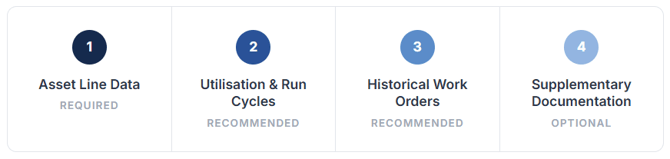
CAMS uses your asset data to build predictive lifecycle models, generate long-term financial plans, and surface maintenance intelligence across your portfolio. The more data you provide, the more accurate and actionable the platform's outputs become. Tier 1 is the minimum requirement. Tiers 2–4 progressively unlock deeper analytics and forecasting capability.
① Asset Line Data
Your asset register is the important for all CAMS analysis.
A spreadsheet format (XLSX or CSV) with a minimum of 1,000 asset line items across multiple buildings or sites would be beneficial. Registers with fewer than 1,000 lines can still be ingested and we can work with you to build your asset repository from scratch.
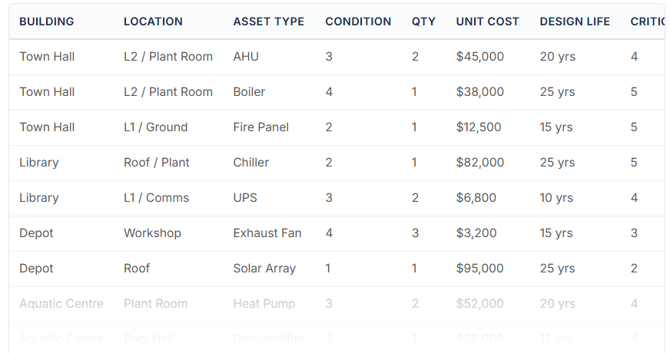
Each row should represent a single asset and capture enough detail for CAMS to build hierarchies, assign lifecycle curves, and generate condition-based forecasts. At a minimum, we need an asset name or description, its type or category, and the building or site it belongs to. Location detail matters too: floor, zone, or plant room references let CAMS place assets within the hierarchy correctly.
For lifecycle modelling, include a condition rating, quantity, unit replacement cost, manufacturer or make, and the manufacturer's design life in years. If you have install or commission dates, include those as well. CAMS uses criticality ratings and annual budget allocations to prioritise renewal scenarios and generate funding gap analysis. Where your register uses parent-child relationships or hierarchy references, preserve those so we can reconstruct the full asset tree on import.
② Utilisation & Run Cycle Data
Where available, utilisation and run cycle data allows CAMS to move integrate deterioration models with actual operational load.
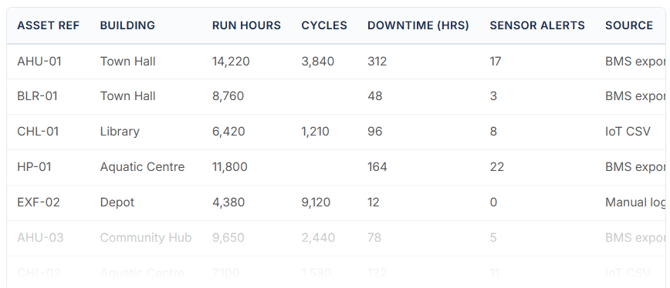
Useful inputs include usage hours or operating hours, run time logs, and cycle counts that record how hard an asset has been working. Downtime logs help CAMS identify availability patterns. If your building management system captures sensor events, alerts, or trend data, these will enahcne predictive power. IoT data streams from connected equipment and seasonal load profiles round out the picture and give CAMS the inputs it needs to adjust deterioration curves to real-world operating conditions.
We accept spreadsheets (XLSX, CSV), BMS exports, IoT platform exports (JSON, CSV), or direct API integration where supported. Time-series data should include timestamps and asset identifiers that map back to the Tier 1 register.
③ Maintenance and Work Order Data
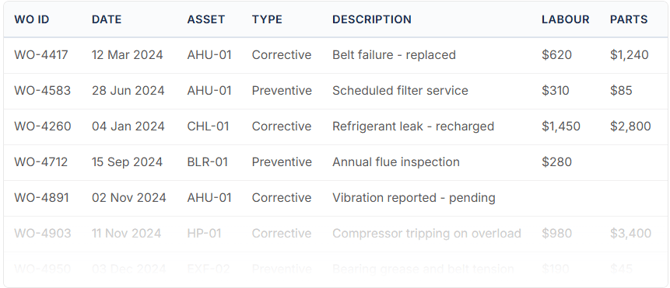
Corrective and preventive maintenance history feeds directly into the CAMS CMMS module and can integrate with failure prediction and intervention planning. Work order records help the platform calibrate deterioration curves against real-world maintenance events and identify recurring failure patterns across your portfolio.
Each work order can carry information such as a unique reference or ID, a request date, and a work type classification (corrective or preventive). Include the asset or location reference so CAMS can link the event to the right record in your register. The description or fault details and the actions taken give the platform the narrative context it needs to classify failure modes. Status history, completion dates, and completion notes track the full lifecycle of each job. Labour hours, labour cost, materials and parts cost, and a priority or urgency rating allow CAMS to build cost profiles and weight intervention scenarios.
You can export work orders from CMMS or CAFM systems such as Archibus, MEX, TechnologyOne, SAP PM, Maximo, or similar. Standard spreadsheet exports (XLSX, CSV) are accepted. Where possible, include the full status history rather than just the current state.
④ Fine-tuning and Supplementary Information
Additional documentation enriches CAMS models, AI capabilities and supports more granular analysis. This data can depth to portfolio intelligence, compliance tracking, and spatial context.
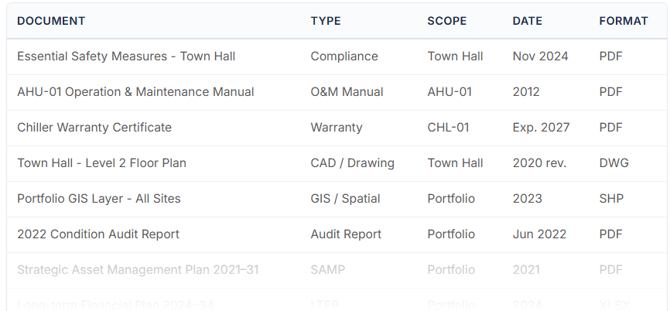
On the compliance side, certificates, regulatory documentation, and warranty records help CAMS flag expiry dates and track obligations. Asset knowledge documents and O&M manuals give the platform reference material for maintenance planning. If you hold GIS or spatial data, CAD drawings, floor plans, or site maps, these let CAMS anchor assets to physical locations and support map-based visualisation. Photographs and inspection images from previous condition audits provide visual baselines. Previous condition audit reports, strategic asset management plans, and long-term financial plans give CAMS historical context to benchmark its own modelling outputs against.